

Your caller rings one number and reaches whoever really is available, including out of the office.
Unexus Connect · mobile
your landline number works on the road too
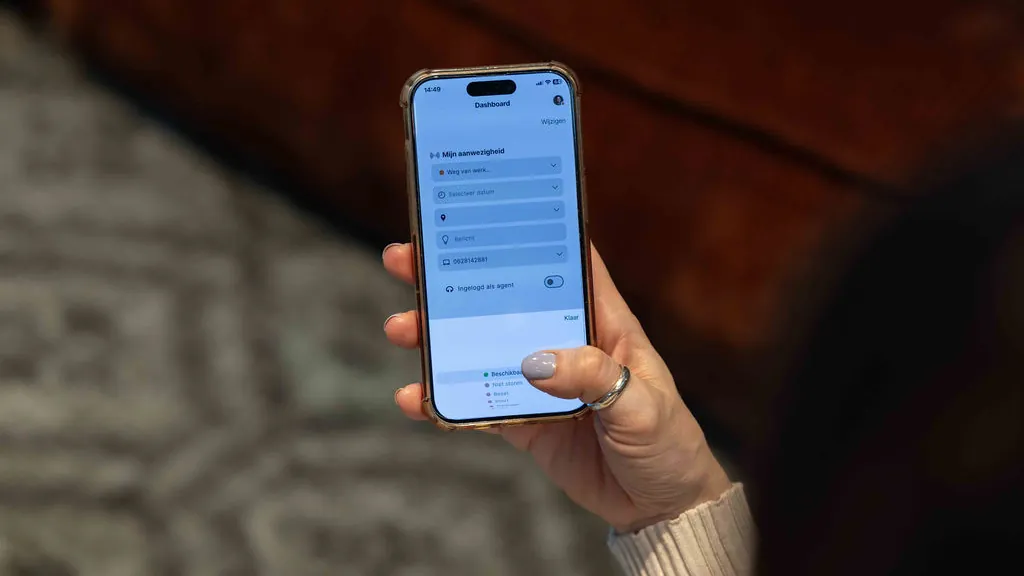
Half your team works away from the office, and your caller should not notice a thing. With Unexus Mobile Connect the mobile handset simply takes part in your customer contact: the same queues, the same call rules, the same number. You decide per colleague how.
01 · sound familiar?
A caller, just as you are heading out
The colleague handling it is in today, just not at the office. The caller gets the desk voicemail, then tries the mobile number, and meanwhile nobody can see whether they are reachable at all. That turns every handset into an island of its own. So we put mobile firmly inside the platform. If your colleague is working away from the office, nobody notices.
- A mobile call runs outside your routing and outside your reporting.
- Nobody can see whether a colleague on the road is reachable. Transferring becomes guesswork.
- Dialling out from a mobile number: the caller does not recognise it, and rings back on it anyway.
02 · what it is
Your mobile as a channel in its own right
Unexus Mobile Connect links mobile telephony to Unexus Connect. A call goes past the platform first: it checks who is available, picks according to your call rules and then sends it to the handset. SIM cards, numbers and users you manage yourself in the customer portal. And which mode suits whom is up to you.
Business mode
The handset is a full part of the platform. Availability is registered automatically, call rules run centrally, and outgoing calls use the landline number. Working on the road as if you were at your desk.
Personal mode
The handset works like an ordinary mobile subscription, and private stays private. Business calls are still possible through the app, on the business number.
three ways, one platform
How your colleagues use their handset is up to you. In all three they take a full part in customer contact. The difference is in the way of working.
| business mode | personal mode | personal with app | |
|---|---|---|---|
| Reachable on the business number | yes | yes | yes |
| Taking part in the queues | yes | yes | yes |
| App needed on the handset | no | no | yes |
| Forwarding from the platform | yes | no | no |
| Calls through Unexus Connect, with logging | yes | no | no |
Availability does not depend on the mode. With a business Odido number, colleagues in the web client always see whether someone is on a call, whether they are being called or calling out. In personal mode calls otherwise run through the phone’s own app, and forwarding from the platform plays no part there.
03 · what you get out of it
Why mobile belongs in your platform
Colleagues can see each other’s availability, so transferring is no longer a guess.
Dialling out on the landline number: recognisable, and anyone who rings back lands in your routing.
SIM cards, bundles and numbers you manage yourself in the customer portal.
04 · who notices
they profit from it straight away
Your colleague
Works away from the office without a second number or a separate voicemail. Business and private stay neatly apart.
Your manager
Sees mobile calls in the reporting like any other, with the same call rules as at the office.
Your caller
Rings the familiar number and gets someone who really is available. Where they are sitting does not matter.
Your IT colleague
Manages numbers, SIM cards and users in one customer portal, alongside the platform already in place.

on the road
reachable out of the office too
05 · how it works in practice
an ordinary Friday morning
A tenant rings the landline number of the colleague handling his application. The platform sees that she is working away from the office today and is signed in on mobile, and sends the call straight to her handset. Colleagues can now see she is on a call; a second caller goes to an available colleague, following the call rule.
Tenant helped on the number he already had, nobody disturbed, and the routing did the work.
06 · what you need to arrange
less than you think
Count on six to ten weeks, depending on the notice periods with your current provider and the porting slots available. Your existing mobile numbers simply come with you.
This is our estimate for a common set-up. If yours is different, you will hear that from us before we start.
lead time
Switching to Unexus Mobile Connect
six to ten weeks, depending on notice periods and porting slots
Prerequisite
an active Unexus Connect environment with the fixed telephony through Unexus
Sorted in four steps
-
step 1
We take stock of your current numbers, providers and contract terms.
-
step 2
We plan the port and supply the SIM or eSIM cards.
-
step 3
On the porting date we move the numbers across and attach the licences.
-
step 4
We switch on business mode where you want it and check every handset in your environment.
07 · for your IT colleague
what is under the bonnet
Everything your IT colleague wants to know before saying yes.
the technical details Needed · SIM cards · Modes · Business mode · Up front
| Needed | An active Unexus Connect platform, an Odido SIP trunk provided through Unexus, and a Unexus Connect user licence per colleague. |
|---|---|
| SIM cards | Odido SIM cards or eSIMs. On delivery a new number is active; porting your existing number replaces it. |
| Modes | Business: calls run through the platform and availability is always visible. Personal: calls run straight over the mobile network; with the app the colleague can still call on the business number, with availability visible. |
| Business mode | Forwarding according to your call rules, number restrictions where needed, and call recording, transcription and summaries if you switch them on. |
| Up front | If your fixed telephony does not run through Unexus yet, that migrates first. Without the trunk the fixed-mobile integration does not work. |
The platform decides who is available and which number your caller sees. That keeps the technology where it belongs: in the background.
08 · privacy principles
what we process, and in which mode
In personal mode a call runs straight over the mobile network and the platform plays no part. Private really does stay private. In business mode the call runs through Unexus Connect, and you decide what happens with recordings, retention periods and access rights.
Your data stays within Europe. Unexus is ISO 27001 certified and the systems are thoroughly and independently tested every year.
questions you probably have by now
Do we keep our mobile numbers?
Yes. Existing numbers are ported across. A new SIM or eSIM starts with a temporary number, which is replaced as soon as the port is complete. If you do not port, the newly assigned number stays active.
Do colleagues have to install an app?
Not in business mode. In personal mode the app can be added. That lets someone dial out on the business number, and the platform can see they are on a call.
Does this work if our fixed telephony is not with Unexus yet?
Not straight away. An Odido SIP trunk has to be in place, and that is what links the fixed and the mobile network. If you do not have one yet, the fixed telephony migrates first. That comes up during the intake. get in touch
How long does it take?
Six to ten weeks, depending on notice periods and the porting slots available.


want to see how that works?
Half an hour. That is all it takes to show you how your mobile handsets take part in your customer contact. Bring your IT colleague along and we will go through the SIM cards and the porting at the same time.
No obligations. Would you rather look around on your own first? The hard facts are on security & compliance.